BSS File Management
Several interfaces can be used to view, edit, and manage files in a BSS, including:
Only BSS Explorer, CygNet Explorer, and BSSC can be used to delete files from a BSS.
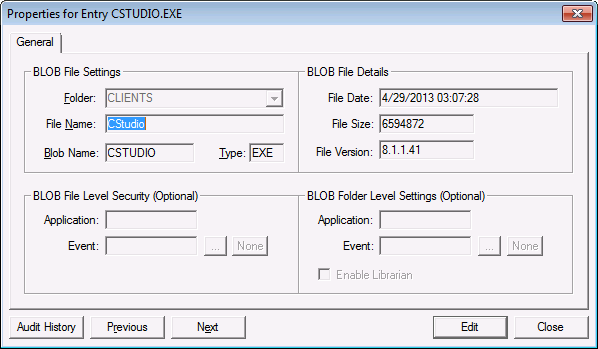
File information can be viewed in the Properties for Entry <file name> dialog box.
- Right-click in the service pane and select New to upload (add ) a new file to the BSS.
- Right-click a file name and select Properties (or double-click) to view information about the file. By default the Properties for Entry <file name> dialog box opens in View (or read-only) mode. Use the Previous and Next buttons to scroll through the files in the BSS in View mode.
- Click Edit to modify a file record. The Previous and Next buttons are disabled in Edit mode.
- Click Audit History to view an audit history trail for the file record. See Auditing for more information about how auditing works in CygNet Software.
|
Properties for Entry |
Manipulate Folders and Files Via Script
See CxScript.FileSystemObject for manipulating folders and files in a BSS.

